A revision session with a clear subject
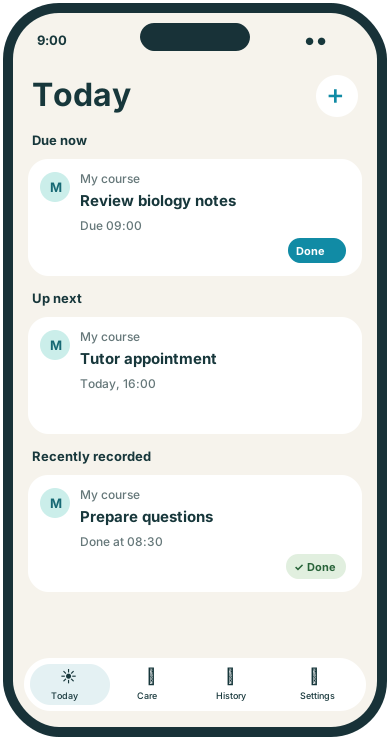
Use a task name such as Review biology notes or Practise vocabulary. Choose the days and times from your own study plan, then record that you handled the session.
 TendMark
TendMark for study & revision
You know you need to study. Deciding what to start, and remembering the small jobs around it, can take up half the effort. A reminder for one clear action makes the next step easier to find.
Free to start. No account. No adverts.
Sound familiar?
A broad note saying “do some revision” leaves you with another decision to make. Meanwhile, printing the worksheet, checking the submission date or preparing for a tutorial can slip through the gaps.
Name the next piece of work clearly and give it a time. Keep independent tasks as separate routines so you can see what is still due. Record what you handled without turning a scheduled session into an assumed achievement.
Room for real life
Use a task name such as Review biology notes or Practise vocabulary. Choose the days and times from your own study plan, then record that you handled the session.
Add dated reminders for an action such as Check essay references or Upload coursework. Use dates from your course information and confirm any submission in the system your course uses.
Put a confirmed tutorial or lesson in as an appointment. If you need to prepare questions or pack equipment, keep that as a separate routine before the visit.
Make it yours
TendMark can organise study and revision reminders on iPhone. Schedule the sessions and preparation tasks you choose, keep confirmed lessons as appointments and record the actions you complete.
See free and Premium featuresUse your own Person profile or a custom profile named for a course. Pick whichever keeps the reminders easiest to recognise.
Choose a specific piece of preparation or study and enter its schedule. A one-off routine suits a dated task; a repeating routine can prompt a regular session.
Use Done or a custom completion word. Check your entries in History, and change the future schedule if the plan needs adjusting.
A little more clarity
Your course calendar, learning materials and study method can stay where they already work for you. TendMark adds reminders for the actions you want to remember, alongside the rest of your day. It can keep several course-related tasks under a profile and show future lessons in Care. Each recorded outcome tells you what you entered; it does not assess understanding or measure the quality of the session.
Before you get started
Yes. Create routines for your chosen subjects or activities and enter the schedule yourself. You can record each handled session afterwards.
No. TendMark provides reminders and recorded outcomes. Use your preferred learning tools for timed sessions, flashcards or course materials.
Yes. Enter a dated routine using your verified deadline and choose advance reminders where useful. TendMark does not import or check course deadlines.
No. It is your own record. Confirm that the work was received in the submission system your course uses.
A calmer way to care
Start with the routines that matter to you. TendMark is free to download for iPhone, with optional Premium upgrades.