Your own health and personal appointments
Keep a dentist appointment, eye test or haircut in your own profile. Add useful details so you know what the booking is when it comes round.
 TendMark
TendMark for appointments
An appointment can be safely written down and still sneak up on you. Keep the date, details and reminders together in TendMark, whether it is your dentist, a parent’s check-up or the dog’s next trip to the vet.
Free to start. No account. No adverts.
Sound familiar?
Booking something is only the first job. You may need time to arrange a lift, find paperwork or leave work early. A date buried in a message does not always give you that breathing space.
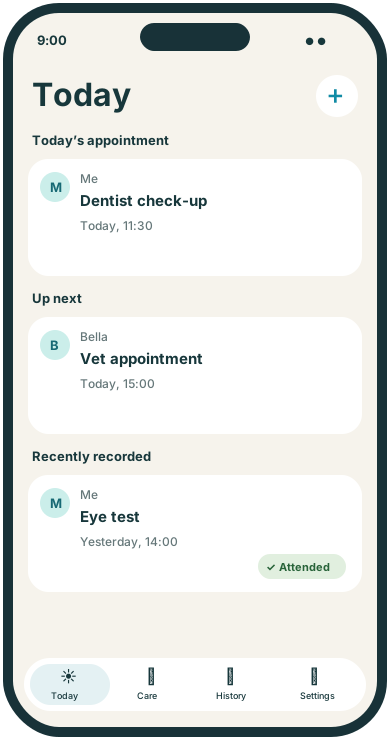
Keep the appointment with the person, pet or thing it belongs to. Choose reminders that suit your preparation. Future appointments appear in Care, and Today brings the day’s appointments into view alongside your routines.
Room for real life
Keep a dentist appointment, eye test or haircut in your own profile. Add useful details so you know what the booking is when it comes round.
Use a separate profile for the person you support. Keep the booking and notes together, and choose advance reminders for the preparations you need to make.
Put the vet appointment with the pet, a garage booking with the vehicle or a booked visit with your home profile. Each date stays in context.
Make it yours
TendMark is an appointment reminder app for iPhone. Add appointments to profiles, choose up to three advance reminders and record Attended, Cancelled or Missed after the appointment ends.
See free and Premium featuresAdd the appointment to the right profile with its date, time and useful details. TendMark does not make the booking for you.
Choose up to three reminders. Custom amounts in minutes, hours, days or weeks let you plan a useful lead time.
After the appointment ends, record Attended, Cancelled or Missed. Keep the outcome in History instead of relying on an old calendar entry.
A little more clarity
An early reminder can help you prepare, while another nearer the time can prompt a final check. For example, you might choose the day before and an hour before a visit. These are timings you choose, rather than travel estimates. Notification delivery still depends on your iPhone settings and system limits.
Before you get started
An appointment can have up to three reminders, including custom amounts in minutes, hours, days or weeks.
No. You enter a booking you have arranged yourself. TendMark does not contact the clinic, vet, garage or other provider.
No. Add to Apple Calendar opens Apple’s event editor so you can choose whether to save a separate copy. Later changes in either place do not update the other.
After an appointment ends, you can record Attended, Cancelled or Missed. History shows the outcome you entered; it does not verify attendance automatically.
A calmer way to care
Start with the routines that matter to you. TendMark is free to download for iPhone, with optional Premium upgrades.