Bins, recycling and weekly chores
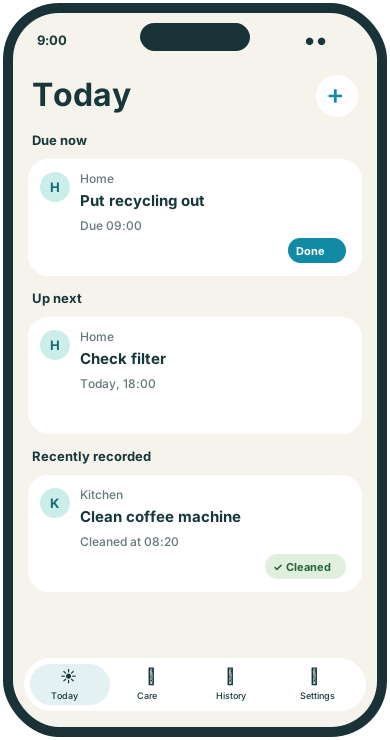
Set reminders for collection-day preparation or your own cleaning routine. Use clear task names such as Put recycling out so there is no extra decoding to do.
 TendMark
TendMark for home & household
Putting the bins out. Changing a filter. Booking the service you meant to arrange last month. Keeping a home going is a lot of small jobs, and remembering them can feel like a job of its own.
Free to start. No account. No adverts.
Sound familiar?
Some household jobs repeat so often they become invisible. Others happen just rarely enough to fall out of memory. They can end up scattered across notes, messages and the running list you carry around all day.
Put your home’s recurring jobs in one profile, or give a particular piece of equipment its own. Set a useful schedule and record the work after you do it. When you need to know when something was last handled, check your entries in History.
Room for real life
Set reminders for collection-day preparation or your own cleaning routine. Use clear task names such as Put recycling out so there is no extra decoding to do.
Keep user-entered checks and maintenance jobs with a home or equipment profile. Use the intervals recommended in the product instructions and record what you actually do.
Create a one-off routine to arrange a service or repair. Once it is booked, add the visit as an appointment with its own reminders.
Make it yours
TendMark is a household reminder app for iPhone. Organise chores and home maintenance into user-entered routines, receive reminders and record when you handle each job.
See free and Premium featuresCreate a Home profile, or a separate Equipment profile where that makes a long-term record easier to follow.
Add a few useful routines first. Choose daily, weekly, monthly, yearly, one-off or every-few-days schedules.
Use Done, Cleaned, Checked or another completion word. Record the outcome after handling the task, rather than when you dismiss a reminder.
A little more clarity
A household task tracker is most useful when it reflects your actual home. You choose the jobs and their timing, whether that is a weekly recycling check or an occasional filter change. TendMark keeps a history of your entries so you can check what you recorded instead of working backwards from memory.
Before you get started
Yes. Create a weekly routine, or an every-few-days routine where that fits your collection pattern. Check your council’s actual schedule and update the routine for exceptions.
Yes. Enter a routine using the timing in your product instructions or service plan. TendMark does not determine maintenance requirements or monitor equipment.
There is no live sharing between phones. Each installation holds its own local records.
The free version displays the last 30 days of history. Premium lets you view all saved history beyond that window.
A calmer way to care
Start with the routines that matter to you. TendMark is free to download for iPhone, with optional Premium upgrades.