Regular bills you check yourself
Create a routine for reviewing a bill or making a payment you manage manually. Use a task name and completion label that say exactly what you did, such as Checked for reviewing a statement.
 TendMark
TendMark for bills & renewals
The renewal email arrived while you were doing something else. You meant to come back to it. Now you are trying to find the message and remember whether you dealt with it. Give that next action a reminder of its own.
Free to start. No account. No adverts.
Sound familiar?
Reading a message can feel surprisingly similar to doing the job. When several dates are approaching, it becomes harder to remember which bill you checked, which subscription you reviewed and which provider you still need to contact.
Separate the actions and put each one on your plan. A reminder to review a renewal can come before the renewal date, while a regular bill check can have its own repeating routine. History keeps the outcomes you enter afterwards.
Room for real life
Create a routine for reviewing a bill or making a payment you manage manually. Use a task name and completion label that say exactly what you did, such as Checked for reviewing a statement.
Add a dated reminder to review a subscription or membership. Choose the date from your own records, allowing for any notice period you need to check with the provider.
Use a yearly routine for a date that repeats annually, or a Once routine for a specific upcoming task. Set advance reminders where useful, and update the plan if the provider changes the date.
Make it yours
TendMark is an iPhone reminder app you can use for bill-related tasks, subscription reviews and renewal dates. Enter the dates yourself, name the action clearly and record it once you have handled it.
See free and Premium featuresUse your own profile or a Home or custom profile for household administration. Keep related tasks somewhere you will recognise.
Use the bill, agreement or provider’s information to set the date. A task such as Review membership is clearer than a reminder containing only the provider’s name.
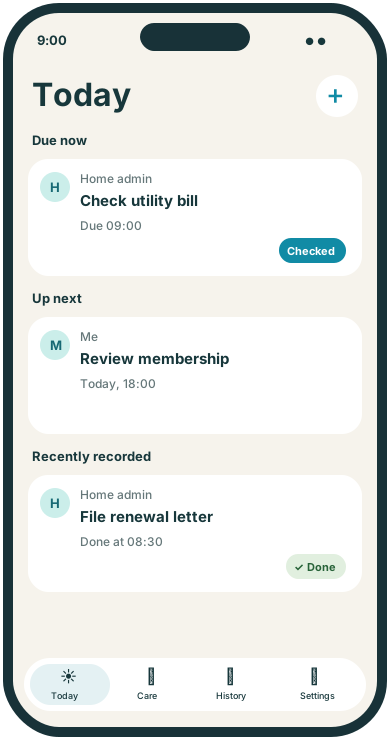
Choose Checked, Done or a custom label. If you use Paid, enter it only after you have confirmed the payment through your provider or bank.
A little more clarity
A reminder is most useful when it tells you what to do next. Checking a bill, contacting a provider and reviewing a renewal are separate actions, even when they concern the same account. TendMark lets each task have its own schedule and recorded outcome. Future dates appear in Care, while Today brings the current jobs into view. Your provider’s records remain the place to check amounts, terms and payment status.
Before you get started
Yes. Create a routine for the action and enter the date and time yourself. TendMark cannot make the payment or confirm it with your bank.
Yes. Use a one-off or repeating routine to remind you to review the renewal. Check the provider’s current dates and terms before setting it up.
No. It follows the schedule you enter. It does not read emails, connect to providers or monitor prices.
No. It records the label you entered. Check your bank or provider’s records to confirm the actual payment.
A calmer way to care
Start with the routines that matter to you. TendMark is free to download for iPhone, with optional Premium upgrades.