Houseplant checks
Create a profile for a plant or a group such as Living room plants. Add a routine to check them and record Watered only when you have watered them.
 TendMark
TendMark for plants & garden
The fern on the shelf. The pots by the back door. The greenhouse you meant to check yesterday. TendMark helps you remember to look after them and keep a record, without having to remember when you last picked up the watering can.
Free to start. No account. No adverts.
Sound familiar?
A busy week is enough to lose track. Plants in different rooms need attention at different times, and outdoor jobs change with the weather. One reminder saying “do the garden” rarely tells you where to start.
Split the work into the checks and jobs you actually do. A reminder can prompt you to check a pot before deciding whether it needs water. Record the outcome, including Not needed when appropriate, so the record reflects the day you had.
Room for real life
Create a profile for a plant or a group such as Living room plants. Add a routine to check them and record Watered only when you have watered them.
Keep checks for outdoor pots, seedlings or the greenhouse separate. Add notes that help you remember your own care instructions and adjust the schedule when circumstances change.
Use routines for checking supports, cleaning tools or other maintenance. Put a seasonal job in as a one-off date rather than leaving it on a scrap of paper.
Make it yours
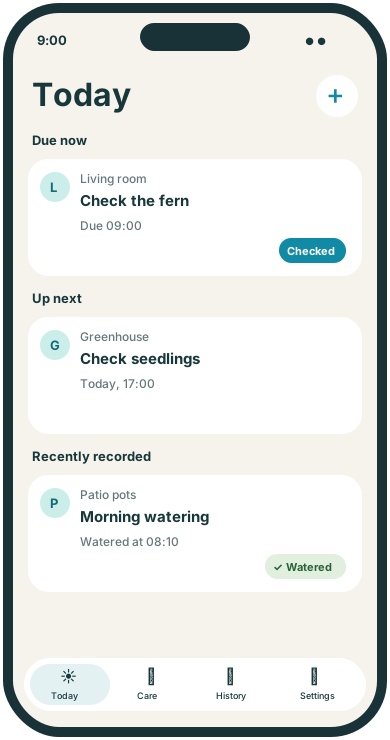
TendMark is an iPhone reminder app for plant watering checks and garden care jobs. Create profiles for individual plants or areas, choose your own schedules and record Watered, Checked or a custom outcome.
See free and Premium featuresUse a plant profile for one specimen, or a recognisable name for an area you look after together.
Set the frequency you want. The reminder is a prompt to assess what needs doing, not an automatic instruction to water.
Record Watered, Checked or a custom label. Use the overdue outcome options if a job was done late, skipped or not needed.
A little more clarity
A record can help you remember your last action, but it cannot tell you how dry the compost is today. TendMark lets you plan checks and record garden care in your own words. You can bring plant jobs into the same Today view as the rest of your routines without losing their separate profiles.
Before you get started
Yes. Set a routine to check or water a plant on your chosen schedule and record what you did. The app does not determine whether watering is needed.
Yes. Name a profile after an individual plant or a group you look after together, then add the routines you want for that profile.
For an overdue routine, the What happened? options include Not needed. You can also make the routine a plant check and use a custom completion word such as Checked.
No. TendMark follows the schedules you enter. You can edit or pause routines yourself as the season and conditions change.
A calmer way to care
Start with the routines that matter to you. TendMark is free to download for iPhone, with optional Premium upgrades.