A break from the screen
Create a reminder to pause your current activity. Choose what that break means for you, whether it is stepping away, changing tasks or taking a quiet moment.
 TendMark
TendMark for movement & breaks
You sit down to finish one thing, then look up and realise the morning has gone. The walk or break you intended to take never quite found a gap. Put a moment for it into your day before the day fills up.
Free to start. No account. No adverts.
Sound familiar?
When a task keeps your attention, the next natural stopping point can keep moving. A vague intention to take a break is easy to postpone again without noticing.
Choose a specific reminder, such as Step away from desk or Planned walk. Give it a time you can act on and a completion word that fits. If the day changes, record the outcome honestly rather than backfilling a perfect day.
Room for real life
Create a reminder to pause your current activity. Choose what that break means for you, whether it is stepping away, changing tasks or taking a quiet moment.
Keep a walking reminder with your personal profile. Use Walked after the activity, while keeping in mind that the app does not record distance, route or pace.
Add a reminder for an activity you already do or have been advised to do. TendMark can prompt that routine, but the instructions and decisions about the activity remain with you and your adviser.
Make it yours
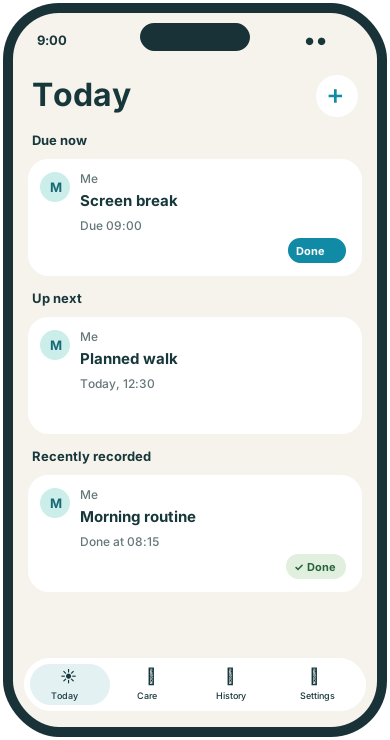
TendMark can remind you about movement, screen breaks and activities you choose. Set exact times for your plan and record an outcome afterwards. It does not measure the activity itself.
See free and Premium featuresCreate a routine under your own profile. Use the action you want to remember, not a broad instruction to be more active.
Enter exact times and repeat days yourself. Use separate routines where the activities need different schedules or completion words.
Use Done or Walked after handling the activity. Review those entries in History if you want to check what you recorded.
A little more clarity
Some days have room for a regular pause; others need a different approach. You can edit or pause a routine as circumstances change. Multiple exact times let one recurring break appear several times on a scheduled day, each with its own outcome. TendMark does not watch your screen use or decide when you have been sitting too long. It simply follows the plan you enter.
Before you get started
No. Reminders follow your chosen schedule. It does not monitor posture, movement or screen use.
Yes. A regular routine supports up to eight exact times on a scheduled day. Each time has its own outcome.
You can create reminders for your existing plan. Follow the instructions from the professional who gave you the exercises; TendMark does not supply or adapt them.
No. TendMark reminds you about the activity and records what you enter afterwards. It does not include a break timer or step counter.
A calmer way to care
Start with the routines that matter to you. TendMark is free to download for iPhone, with optional Premium upgrades.