Instruments and creative equipment
Create a profile for an instrument or piece of creative kit. Add the cleaning or inspection routine you already follow, using its maker’s guidance for what to do and when.
 TendMark
TendMark for equipment & hobbies
The camera you take everywhere. The guitar waiting on its stand. The coffee machine that works harder than anyone in the house. The things you enjoy using need care too, and it is surprisingly easy to lose track of the last clean or check.
Free to start. No account. No adverts.
Sound familiar?
You remember the sessions, trips and cups of coffee. The small maintenance jobs are much harder to place. A reminder on its own can disappear into a busy day, leaving you with the same question next week.
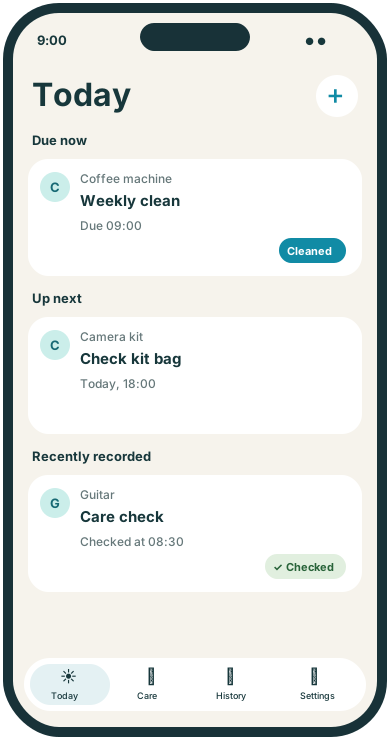
Keep the routine with the item it belongs to. You can separate the daily clean from an occasional check or a booked repair, then leave an outcome in History after handling each job.
Room for real life
Create a profile for an instrument or piece of creative kit. Add the cleaning or inspection routine you already follow, using its maker’s guidance for what to do and when.
Use reminders to inspect or prepare your own equipment before a planned outing. A dated routine can prompt a kit check; a separate appointment can hold a booked repair or service.
Remember the maintenance tasks in your appliance instructions. Record Cleaned or Checked afterwards so you can look up your last entry without guessing from memory.
Make it yours
TendMark is an iPhone reminder app for equipment maintenance and hobby care. Give an item its own profile, enter routines from its care instructions and record the jobs you complete.
See free and Premium featuresChoose an Equipment or custom profile and give it a recognisable name, such as Camera kit or Coffee machine.
Create separate routines for jobs with different schedules. Use the manufacturer’s care instructions rather than relying on an app to invent an interval.
Choose a completion word such as Cleaned, Checked or Done. Use History to review the entries you have made.
A little more clarity
A general note saying “sort the equipment” can be easy to put off. A named routine for one item gives you a clearer next action. Daily, weekly, monthly and every-few-days schedules cover regular jobs; one-off routines can hold preparation for a specific outing. TendMark keeps these plans alongside the rest of your day.
Before you get started
Yes. Enter the care tasks and timings you already follow, with a profile for the instrument or equipment. TendMark does not give instrument-specific maintenance advice.
Yes. Choose a Once routine with your preparation date and time. Record the outcome after you have handled the job.
It follows the schedule you enter. It cannot detect condition, faults or usage, so use the product instructions and professional advice where needed.
Yes. Use separate profiles for items that need their own routines and history. The free profile and routine limits apply across the app.
A calmer way to care
Start with the routines that matter to you. TendMark is free to download for iPhone, with optional Premium upgrades.