Checks during the next visit
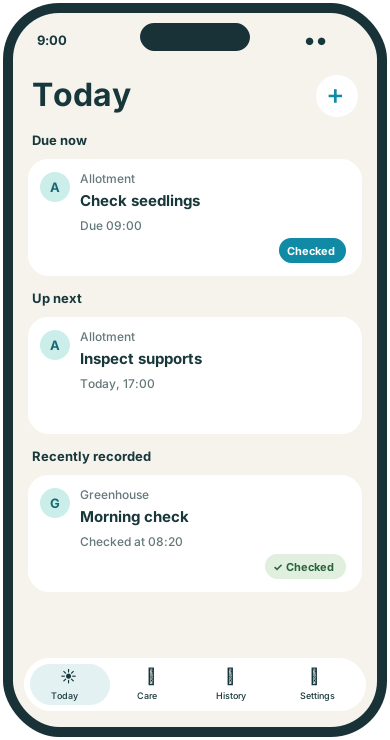
Create a reminder to inspect seedlings, supports or a particular bed. Record Checked after looking, rather than treating the reminder as proof of a condition.
 TendMark
TendMark for allotments
There is the job you went to the allotment to do, and the three you noticed while you were there. TendMark helps you give the next visit a plan and keep a record of the work you have handled.
Free to start. No account. No adverts.
Sound familiar?
When the plot is away from home, a useful intention has a journey to survive. Different areas may need different checks, and seasonal jobs can be easy to remember a little too late.
Put the next action into a routine while it is fresh in your mind. Keep your plot’s jobs separate from houseplants at home, and use the dates and intervals that fit your own growing plan.
Room for real life
Create a reminder to inspect seedlings, supports or a particular bed. Record Checked after looking, rather than treating the reminder as proof of a condition.
Enter sowing, planting or preparation dates from the guidance you follow. Use a one-off routine when this year’s conditions need a particular date.
Keep equipment care or manual watering checks attached to the plot or a separate profile. Record the work only after assessing what is needed and handling it.
Make it yours
TendMark is an iPhone reminder app for allotment and vegetable-garden jobs. Create profiles for a plot or area, enter your chosen checks and dates, and record the outcomes yourself.
See free and Premium featuresCreate a Plant or custom profile for the plot, greenhouse or bed you want to organise.
Choose a dated job or a regular check. Add notes from your own plan where they help you remember what you intended.
Use Checked, Watered or a custom completion word. Review History before deciding what to look at on the next visit.
A little more clarity
TendMark works best here as a place for your decisions and records. It can prompt a visit or check, keep a dated job visible and hold the outcome you enter. It does not decide what a crop needs. You can change or pause a routine when conditions or your plans change, rather than following a reminder mechanically.
Before you get started
No. You enter dates from your own growing plan or trusted guidance. TendMark reminds you about the jobs you choose.
Yes. Create separate profiles if their checks and records would be easier to manage that way.
No. Schedules do not adapt to weather. A reminder can prompt you to check conditions before deciding whether watering is needed.
Yes. Core routines and history work offline, and scheduled notifications do not require an internet connection.
A calmer way to care
Start with the routines that matter to you. TendMark is free to download for iPhone, with optional Premium upgrades.